Why Kinetic Captions Break in Bangla — and What It Takes to Ship Them
Animating captions word by word is trivial in English and quietly broken in Bangla and Hindi. Building iChat's reel studio — 11 caption styles, three scripts, rendered on the phone itself — the typography was the hard part, not the video.
 Ayan Parvaiz6 min read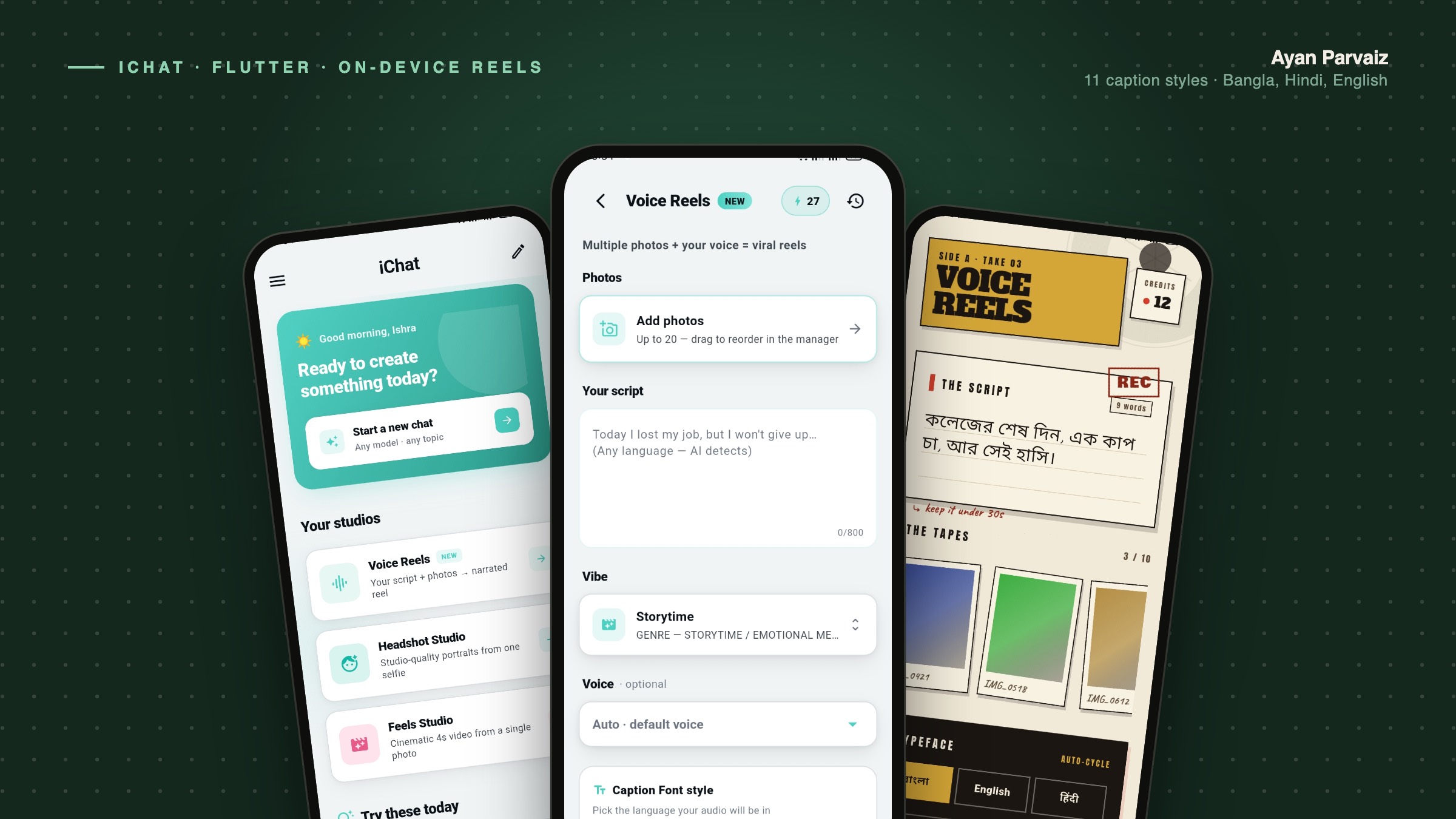
Kinetic typography is the easiest feature to demo and one of the easiest to get quietly wrong. You take a line of narration, split it up, and reveal the pieces in time with the audio. In English it works on the first try. Type the same feature in Bangla and it falls apart in a way that no test catches, because the video still renders — it just renders text that a Bengali reader would call broken.
We hit this building iChat, a creator app where you write a short script, add photos, and the phone turns it into a narrated reel with captions burned in. Eleven caption styles, three scripts — Bangla, Hindi and English — and the whole render happens on the device. The video pipeline was the part I expected to be hard. It wasn't. The typography was.
A character is not a letter
The naive version of caption animation is one line:
for (final c in text.split('')) {
  // fade each piece in
}
split('') in Dart gives you UTF-16 code units. Even the slightly better version, iterating runes, gives you code points. Neither is what a reader sees as a letter.
Take the Bengali cluster ক্ষ. That is three code points: ক, then the virama ্, then ষ. Rendered together the font shapes them into one conjunct glyph. Animate them separately and the viewer watches a consonant appear, then a bare virama sitting on its own, then another consonant — three frames of nonsense before the word resolves.
Vowel signs are worse, because they move. In Bengali, ি is written before the consonant it follows in memory. In Hindi, the same is true of ि. So a "reveal left to right by code point" animation shows the vowel mark before the letter it belongs to, which is not just ugly — it is a different reading order than the one the script actually uses.
The correct unit is the grapheme cluster: what Unicode defines as a single user-perceived character. Dart ships this in package:characters:
import 'package:characters/characters.dart';

for (final c in text.characters) {
  // one user-perceived character at a time
}
That fixes the obvious breakage. It does not fix everything — Indic conjunct handling in the grapheme-cluster rules has been refined across Unicode versions, and which behaviour you get depends on the version your toolchain ships.
Which leads to the rule I would give anyone building this:
For Indic scripts, animate whole words, not characters. You lose a little of the per-letter flourish and you gain text that is always readable at every frame.
Word-level reveal is also closer to how people actually read captions on a phone at arm's length. We treat character-level animation as a Latin-only flourish and word-level as the default everywhere else.
Eleven styles times three scripts is a font matrix, not a font list
"11 caption font styles" sounds like eleven font files. It is not.
A display face built for Latin headlines — the kind that makes a caption look like a movie title — almost never carries Bengali or Devanagari glyphs. Ask it to render বাংলা and you get tofu: a row of ▯▯▯▯. The video still renders. Nobody sees an exception. The user sees empty boxes where their sentence should be.
So each style is really a set of faces, one per script it supports, chosen so the personality survives the switch. That means:
- Every style needs a documented coverage list — which scripts it actually has glyphs for.
- Every style needs a fallback that is not just "something that renders", but something whose weight and width still look like the style the user picked.
- The picker has to resolve the face from the script of the text, not from a language setting buried in preferences. Users write Banglish, switch mid-sentence, paste from somewhere else. The app has to look at the string.
Detecting the script is the easy half — Unicode block ranges get you most of the way for Bengali and Devanagari. The discipline is in refusing to ship a style until the whole matrix is filled, because a missing cell is invisible in code review and glaring in a rendered video.
The other trap: check your glyph coverage on device, not in the design tool. A font that renders beautifully in Figma may be subset by the build, and a subset that dropped a conjunct only shows up on a real phone.
Why the phone does the rendering
The obvious architecture for video is a server: upload the photos and the audio, composite in a queue, hand back a URL. It is easier to build and much easier to debug.
We render on the device instead, and the trade is worth naming honestly.
What you get. No upload of a user's personal photos, which is both a privacy and a bandwidth win — on a shaky mobile connection, uploading twenty images to render a thirty-second reel is the slowest part of the whole flow by a wide margin. No per-render infrastructure cost, which for a credit-priced consumer app is the difference between a viable unit economic and a bad one. And the render finishes whether or not the network holds.
What you pay. You are now running a video pipeline on hardware you do not control, including mid-range phones that thermally throttle. Everything gets a budget — resolution, frame rate, how many images, how long. Our limits (up to twenty photos, scripts kept short) are not arbitrary product decisions; they are the shape of what finishes reliably on the low end of the device range.
A render that survives the user leaving
The failure mode that matters most on-device is the one that has nothing to do with video: the user starts a render and switches apps.
On mobile that is normal behaviour, not an edge case. A message arrives, they reply, they come back a minute later. If a half-finished render lives only in memory, they come back to nothing and quietly conclude the app is broken.
So reels are auto-saved as they are composed. The work in progress is durable state, not a variable in a widget. It is unglamorous plumbing and it is the difference between "the app lost my video" and "the app is fine."
The same instinct applies to the finished file: save to the gallery first, then offer sharing to WhatsApp or Instagram. The share sheet can be cancelled, the app can be killed, the target app can misbehave — none of that should cost the user their reel.
The checklist
If you are adding captioned video to an app that serves more than one script:
- Animate by grapheme cluster at minimum; by word for Bengali, Devanagari and other complex scripts
- Never split by
split('')or by runes for display purposes - Detect the script from the text itself, not from an app language setting
- Fill the whole style × script font matrix before shipping a style
- Verify glyph coverage on a real device, after the build has subset your fonts
- Budget the render — resolution, frame rate, input count — against your slowest supported phone
- Make in-progress renders durable, so leaving the app never costs work
- Save to the gallery before you open the share sheet
None of this is exotic. It is the ordinary cost of treating Bangla and Hindi as first-class rather than as "internationalisation" to be added later — and it is most of the reason the caption feature took longer than the video pipeline it sits on top of.